If your car suddenly tells you “Stop Start Not Ready Battery Protection Mode,” it can feel confusing and worrying. This message is common in modern vehicles with start-stop systems, but many drivers are unsure what it means, why it appears, and how to respond. Whether you drive a hybrid, a fuel-efficient sedan, or an SUV, understanding battery protection mode is important for safety, reliability, and avoiding costly repairs.
This guide explains the meaning of “Stop Start Not Ready Battery Protection Mode,” why it triggers, what you can do, and how to prevent problems in the future. You’ll learn practical advice, see real-world examples, and discover tips that even experienced drivers sometimes miss.
The goal is to make this technical topic clear—even if English isn’t your first language.
What Does “stop Start Not Ready Battery Protection Mode” Mean?
Modern cars often have a stop-start system. This system automatically turns off the engine when you stop (for example, at a traffic light), then restarts it when you press the gas. The purpose is to save fuel and reduce emissions.
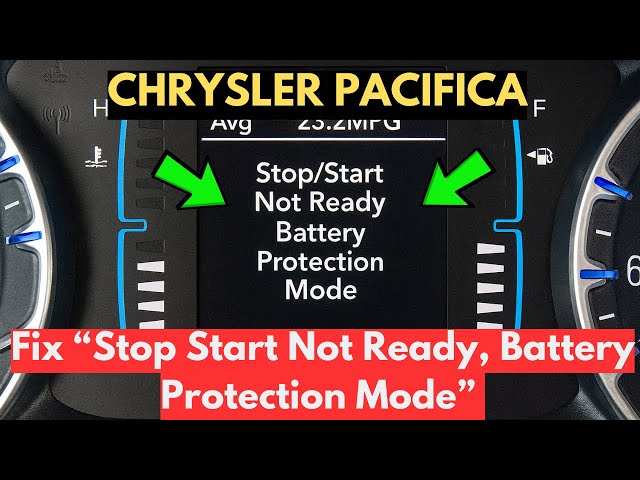
When the system shows “Stop Start Not Ready Battery Protection Mode,” it means your car’s computer has decided not to use the stop-start feature. The reason: it wants to protect the battery.
Why Is Battery Protection Needed?
The stop-start system depends on a healthy battery. If the battery is weak, old, or low on charge, frequent engine starts can make things worse. The car’s computer monitors battery health and temporarily disables the stop-start function if:
- The battery charge is too low
- The battery temperature is outside the safe range
- The battery is aging or damaged
- Electrical demand is high (AC, headlights, etc.)
In Battery Protection Mode, your car won’t automatically turn off the engine at stops. This helps prevent the battery from draining further and ensures you can start the engine when needed.
How Stop-start Systems Work In Modern Cars
To understand battery protection mode, it helps to know how stop-start systems operate. Here’s a simple breakdown:
- Sensors measure battery voltage, temperature, and charge level.
- If the battery is healthy, the system turns off the engine when you stop.
- When you release the brake or press the gas, the engine restarts.
- If sensors detect a battery problem, the system disables stop-start and displays the “Not Ready” message.
Types Of Stop-start Systems
There are two main types:
- Passive stop-start: Only works when conditions are ideal. Limited features.
- Active stop-start: More advanced. Adjusts to battery health, cabin temperature, and electrical demand.
Most new vehicles use active systems with complex algorithms. They constantly check the battery and other systems to decide when to activate stop-start.
Common Causes For Battery Protection Mode Activation
The “Stop Start Not Ready Battery Protection Mode” message can appear for several reasons. Understanding these causes helps you troubleshoot and avoid surprises.
1. Low Battery Charge
If your battery’s voltage drops below a certain level, the system goes into protection mode. This often happens:
- After short trips where the battery doesn’t fully recharge
- When the vehicle sits unused for days
- If accessories like headlights or AC are used heavily
2. Old Or Weak Battery
Batteries lose strength over time. Most car batteries last 3–5 years. An aging battery may not hold enough charge for stop-start operation, triggering protection mode even if the car starts normally.
3. Extreme Temperatures
Both hot and cold weather affect battery performance. In very cold conditions, batteries lose power. In extreme heat, batteries can overheat. If the battery temperature is outside safe limits, protection mode activates.
4. High Electrical Demand
Using many electrical features at once—such as heated seats, AC, infotainment, or lights—can stress the battery. The system may disable stop-start to keep enough power for starting.
5. Faulty Battery Sensors
Sometimes, the issue is not the battery itself but a faulty sensor. If the sensor sends incorrect data, the computer may think the battery is weak and activate protection mode.
6. Recent Battery Replacement
After changing the battery, the car’s computer sometimes needs time to “learn” the new battery. During this period, stop-start may not work, and protection mode may appear.
7. Charging System Problems
A failing alternator or charging system can prevent the battery from recharging properly. The computer will notice and disable stop-start to avoid a dead battery.
Diagnosing “stop Start Not Ready Battery Protection Mode”
If you see this message, it’s important to find the cause. Here’s how you can diagnose the problem:
Step 1: Check Battery Health
Use a simple battery tester or visit a mechanic. Check voltage, age, and overall condition. Healthy batteries should show 12.4–12.7 volts when the engine is off.
Step 2: Look For Error Codes
Modern cars store error codes in their computers. You can use an OBD-II scanner to read these codes. Many auto parts stores offer free scanning.
Step 3: Inspect Electrical Loads
Turn off unnecessary accessories (AC, heated seats, etc. ) And see if the message disappears. If it does, the battery may be weak or overloaded.
Step 4: Review Recent Changes
If you recently replaced the battery or had electrical work done, the system may need to reset. Some cars require a battery registration after replacement.
Step 5: Test Charging System
Check the alternator and charging system. With the engine running, battery voltage should be 13. 7–14. 7 volts. If it’s lower, the alternator may be failing.
Step 6: Examine Sensors
Faulty sensors can cause false readings. If everything else checks out, ask a mechanic to test battery sensors.
Practical Solutions And Fixes
Once you know the cause, you can solve the problem. Here are practical steps:
- Recharge the battery: Drive for 20–30 minutes at highway speed to let the alternator recharge the battery.
- Replace the battery: If it’s old or weak, install a new one. Choose the right type for your vehicle.
- Reduce electrical load: Turn off unneeded features to ease battery stress.
- Repair charging system: If the alternator is weak, have it fixed or replaced.
- Reset the system: After battery replacement, some cars need a reset using a scan tool or manual procedure.
- Check sensors: Replace faulty battery or temperature sensors.
Tips That Most Drivers Miss
- Battery registration: Some cars (especially BMW, Audi, Mercedes) require a battery registration process after replacement. This tells the computer about the new battery and avoids false warnings.
- Hidden drains: Sometimes, a small electrical problem (like a bad relay or module) drains the battery slowly. If the battery is always low, ask a mechanic to check for “parasitic drain.”
- Drive longer trips: Short journeys don’t let the battery recharge fully. If you mostly drive short distances, the battery may never reach full charge.
How Battery Protection Mode Affects Driving
While battery protection mode keeps your battery safe, it changes how your car behaves. Here’s what to expect:
- Engine stays on: At stops, the engine won’t turn off automatically.
- Stop-start disabled: Fuel savings and emissions reduction are paused.
- Warning message: The dashboard shows “Stop Start Not Ready Battery Protection Mode.”
- No immediate danger: You can keep driving, but it’s wise to check the battery soon.
If you ignore battery protection mode for a long time, you might face problems:
- Battery won’t recharge fully
- Car may not start reliably
- Other systems (like electronics) may fail

Comparison Of Battery Types For Stop-start Systems
Not all batteries are equal. Cars with stop-start systems need special batteries. Here’s a comparison of common types:
| Battery Type | Suitable for Stop-Start? | Average Lifespan | Cost Range (USD) |
|---|---|---|---|
| Standard Lead-Acid | No | 2–4 years | $50–$120 |
| Enhanced Flooded (EFB) | Yes | 3–5 years | $100–$200 |
| Absorbent Glass Mat (AGM) | Yes (best) | 4–7 years | $150–$250 |
AGM batteries are recommended for vehicles with stop-start systems. They handle frequent starts, last longer, and withstand deep discharges better than standard batteries.
Preventing Battery Protection Mode
You can avoid battery protection mode with good habits and proper maintenance. Here’s how:
- Drive longer trips regularly: Short drives don’t recharge the battery enough. Aim for a 20+ minute drive once a week.
- Turn off accessories when parked: Don’t leave lights, AC, or radio running with the engine off.
- Check battery health yearly: Test voltage and replace batteries before they fail.
- Clean battery terminals: Dirty or corroded terminals can cause poor connections.
- Use the correct battery type: AGM or EFB for stop-start vehicles.
- Register new batteries: If your car requires it, register new batteries with a scan tool.
- Fix charging problems promptly: If the alternator is weak, repair it quickly.
- Watch for electrical drains: If the battery keeps dying, check for hidden electrical drains.
Real-world Example
A 2018 BMW owner noticed the “Stop Start Not Ready Battery Protection Mode” message after a battery change. The stop-start system stopped working, even though the new battery was healthy. The cause: the battery wasn’t registered with the car’s computer. Once registered, the warning disappeared and the stop-start worked again.
Data: Stop-start System Impact
Automakers claim stop-start systems can reduce fuel use by 3–10% in city driving. But the benefit depends on battery health and usage habits.
| Driving Condition | Fuel Savings (%) | Stop-Start Activation Rate |
|---|---|---|
| City traffic | 8–10% | High |
| Suburban roads | 3–5% | Medium |
| Highway | 0–1% | Low |
If battery protection mode disables stop-start, you lose these savings until the battery issue is fixed.
Comparing Battery Protection Mode: Common Vs. Rare Causes
Some causes are frequent, others less so. Here’s a summary:
| Cause | Frequency | Ease of Fix |
|---|---|---|
| Low battery charge | Common | Easy (drive longer) |
| Old battery | Common | Moderate (replace) |
| Extreme temperatures | Occasional | Wait for normal temps |
| High electrical demand | Occasional | Turn off accessories |
| Faulty sensors | Rare | Needs mechanic |
| Charging system problems | Rare | Needs repair |
Most cases are solved by charging or replacing the battery. Rare causes need professional help.
Myths And Misunderstandings About Battery Protection Mode
Many drivers believe battery protection mode is always a sign of a major problem. In reality, it’s a preventive feature. Here are some common myths:
- Myth: My battery is dead if I see this message.
- Fact: Often, the battery just needs charging or is overloaded.
- Myth: Stop-start will never work again.
- Fact: Once the battery is healthy, the system will reactivate.
- Myth: Replacing the battery fixes everything.
- Fact: Some cars need battery registration or sensor checks after replacement.
- Myth: It’s unsafe to drive.
- Fact: The car can be driven normally, but you should fix the battery soon.
Understanding these myths helps you avoid unnecessary worry and expenses.
When To Seek Professional Help
If you’ve tried the basic steps (charging, replacing, reducing load) and still see the warning, it’s time to call a mechanic. Professional help is needed if:
- The battery is new but the message stays on
- Error codes point to sensors or charging system faults
- The car has repeated starting problems
Mechanics use advanced tools to test sensors, alternators, and computer systems. They can solve complex issues that DIY steps can’t.
Frequently Asked Questions
What Is “stop Start Not Ready Battery Protection Mode” In Simple Terms?
It’s a warning message from your car. It means the stop-start system is disabled to protect the battery. The engine will stay on at stops until the battery is healthy again.
Can I Drive With Battery Protection Mode Active?
Yes, you can drive safely. The engine won’t turn off automatically at stops, but there’s no immediate danger. Still, check the battery soon to avoid future problems.
How Do I Fix Battery Protection Mode?
Most often, you need to charge the battery, replace it if it’s old, or turn off extra electrical features. If you changed the battery, make sure it’s registered with the car’s computer.
Does Battery Protection Mode Affect Fuel Efficiency?
Yes. When the stop-start system is disabled, fuel savings are lost—especially in city traffic. Once the battery is fixed, the system will work again and save fuel.
Do All Cars Have Battery Protection Mode?
No. Only vehicles with stop-start systems and smart battery management show this warning. Older cars or simple models may not have it.
Final Thoughts
“Stop Start Not Ready Battery Protection Mode” is a common message in modern cars, especially those with fuel-saving features. While it can be surprising, it’s usually a sign your car is protecting itself from battery damage. With the right knowledge, you can quickly find the cause, fix the problem, and keep your vehicle running smoothly. Remember to use the correct battery type, drive long enough for a full charge, and check your battery regularly. If problems persist, seek professional help. For more technical details, visit the Start-Stop System Wikipedia page.
Taking care of your battery means safer driving, reliable starts, and better fuel economy. Stay informed and your car will thank you.