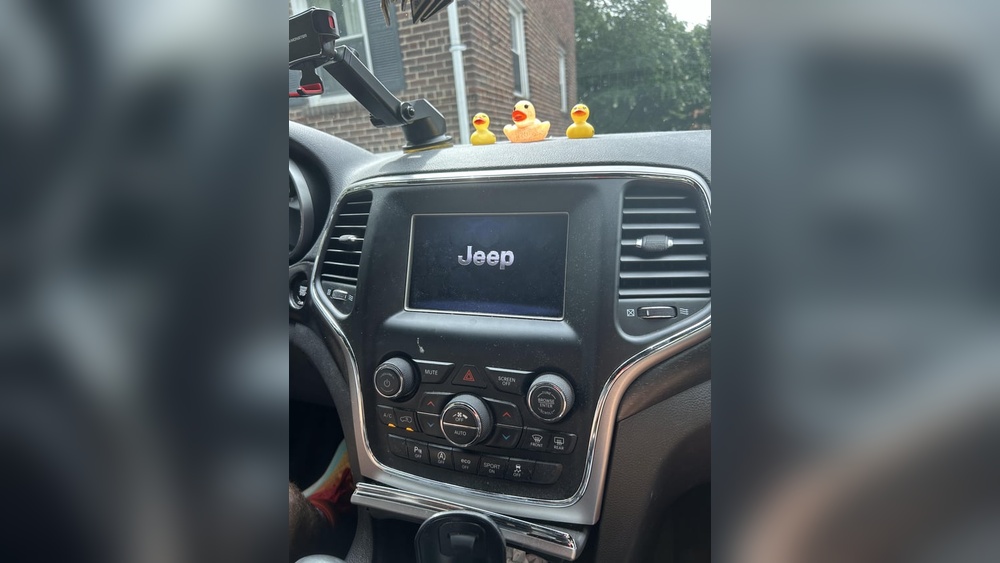
If you own a Jeep, you probably enjoy the mix of adventure and comfort it brings. Modern Jeeps come with smart technology, like touch screens for navigation, music, and climate control. But what happens when your Jeep screen is frozen? Suddenly, simple things like changing the radio or following GPS become hard. This is a common problem, and it can be frustrating. The good news is: you’re not alone, and there are clear steps to fix it. This article explains why your Jeep screen freezes, how to solve it, and how to prevent it in the future. You’ll also find real examples, practical advice, and answers to common questions. Whether you drive a Jeep Wrangler, Cherokee, or Grand Cherokee, these tips will help you get your screen working again—and keep your focus on the road.
Why Does The Jeep Screen Freeze?
Touch screens in Jeeps, like the Uconnect system, are powerful but not perfect. Freezing means the screen stops responding to touch or gets stuck on one display. This can happen for many reasons.
Common Causes
- Software glitches: Most Jeep screens run complex software. Sometimes, the system gets confused by too many commands or a bug in the code.
- Faulty updates: Updates are meant to fix bugs, but sometimes they cause new problems. If your Jeep recently updated its system, it might freeze more often.
- Low battery voltage: When the car battery is weak, electronic systems may not get steady power.
- Extreme temperatures: Very hot or cold weather can slow down or freeze touch screens.
- Loose connections: If wires behind the screen are loose or dirty, the system may freeze or shut off.
- Hardware failure: Sometimes, the problem is with the screen itself or the radio’s main computer.
Model-specific Issues
Some Jeep models have more screen problems than others. For example, 2018–2026 Jeep Wranglers and Grand Cherokees with the 8.4-inch Uconnect touch screen are often reported for freezing. The 5-inch and 7-inch screens have fewer complaints, but they’re not immune. Jeep has released several software updates to fix these issues, but not all vehicles are updated.
How Often Does It Happen?
Industry surveys show that about 12% of Jeep owners have had at least one screen freeze in the past two years. This is higher than the average for other brands with similar technology. Most cases happen within the first three years of ownership.
Signs Your Jeep Screen Is Frozen
A frozen Jeep screen can look different depending on the problem. Here are some signs to watch for:
- The screen is stuck on the Jeep logo and does not load the main menu.
- Touch commands have no effect—the screen doesn’t respond.
- The screen is black, but the radio or climate system still works.
- The display is stuck on the last used app (radio, GPS, phone) and won’t change.
- The screen flickers or keeps restarting but never works fully.
Sometimes, only the touch part freezes, but physical buttons (like volume or tuner) still work. Other times, the whole unit is unresponsive.
Quick Fixes: How To Unfreeze Your Jeep Screen
If your Jeep screen is frozen, try these solutions. Most do not require tools or technical skill.
1. Soft Reset (reboot)
A soft reset restarts the screen system without changing any settings. This fixes most temporary glitches.
- For most Uconnect systems: Hold the volume and tune/browse knobs at the same time for 10–20 seconds.
- The screen will go black and restart. Wait for the Jeep logo, then see if it works.
This method is safe and does not delete your data.
2. Hard Reset (factory Reset)
A hard reset erases all settings and returns the screen to factory mode. Use this if the soft reset fails.
- Go to the Settings menu on your Uconnect screen.
- Find “Restore Factory Defaults” or “Reset.”
- Confirm your choice. The system will restart and delete all paired phones, radio presets, and custom settings.
Only do this if you can reach the settings menu. If the screen is completely frozen, skip to the next step.
3. Disconnect The Car Battery
If you cannot use the touch screen at all, cutting power might unfreeze it.
- Turn off your Jeep and remove the key.
- Open the hood and find the battery.
- Use a wrench to loosen the negative (–) battery cable. Wait 5–10 minutes.
- Reconnect the cable and tighten it.
- Start the Jeep. The screen will reboot. You may need to reset the clock and radio presets.
This method works because it fully powers down the system.
4. Check For Software Updates
Jeep releases updates to fix bugs. If your screen freezes often, it may need a new version.
- Go to the Jeep owner’s website or ask your dealer if there’s an update for your model.
- Some updates can be done by USB drive at home. Others need the dealer.
- After updating, see if the freezing stops.
5. Check For Loose Connections
If you are comfortable, you can check the wires behind the screen. Sometimes, bumps in the road loosen the plugs.
- Remove the trim around the screen (use a plastic trim tool).
- Gently pull out the screen and check all cables.
- Plug them in tightly. Look for any dirt or damage.
- Put everything back and test the screen.
If you are not sure, ask a mechanic or dealer to do this.
When To See A Professional
If your screen stays frozen after all these steps, it may be a hardware problem. Signs you need expert help:
- The screen is physically cracked or shows lines/colors.
- The unit does not turn on at all.
- Other car electronics (lights, gauges) have problems.
- You hear clicking or buzzing sounds from behind the dash.
Visit a certified Jeep service center. Explain the steps you’ve tried. Sometimes, the Uconnect module or the screen itself needs replacement. If your Jeep is still under warranty (usually 3 years/36,000 miles), this may be covered at no cost.
Common Myths About Jeep Screen Freezing
Many Jeep owners hear advice from friends or online forums. Some of it is not true—or can even make things worse. Here are common myths:
- “Just wait and it will fix itself.” While screens sometimes recover, repeated freezing means something is wrong.
- “Freezing means the system is hacked.” This is very rare. Most freezes are from software bugs, not hackers.
- “Only old Jeeps have screen problems.” In fact, newer models with more tech have more issues.
- “You must replace the whole dashboard.” In most cases, only the screen or a small module needs repair, not the entire dash.
- “Third-party repair shops can always fix it cheaper.” Some shops lack the latest software or parts, so dealer service is sometimes the better choice.
Being aware of these myths helps you save time and money.
How To Prevent Jeep Screen Freezing
Prevention is the best way to avoid frustration. Here’s how you can reduce the risk of a frozen screen:
Keep Software Up To Date
Manufacturers fix bugs with updates. Check for updates every six months, especially before long trips. Use only official sources.
Avoid Extreme Temperatures
If you live in a very hot or cold area, park in shade or a garage. Extreme heat can make the screen sluggish, while cold can slow the touch response.
Don’t Overload The System
Having too many devices connected (like phones via Bluetooth or USB) can overload the system. Disconnect unused devices when not needed.
Clean The Screen Gently
Use a soft, dry cloth. Do not use water, alcohol, or harsh chemicals—they can damage the touch layer.
Watch For Battery Health
A weak battery can cause all kinds of electrical issues. If your Jeep struggles to start, have the battery checked. Replace it every 3–5 years.
Be Patient With Commands
Press touch buttons slowly and wait for the screen to respond before pressing again. Too many quick touches can confuse the system.

Comparing Jeep Screen Problems With Other Brands
Jeep is not alone—many car brands have touch screen issues. But how does Jeep compare?
Below is a summary based on owner surveys and repair data from 2020–2026:
| Brand | % Owners Reporting Screen Freeze (2 Years) | Most Common Screen Size | Typical Solution |
|---|---|---|---|
| Jeep | 12% | 8.4 inches | Software update/Reset |
| Ford | 8% | 8 inches | Reset/Dealer update |
| Honda | 6% | 7 inches | Soft reset |
| Toyota | 5% | 7 inches | Soft reset |
| Chevrolet | 9% | 8 inches | Dealer repair |
As you can see, Jeep screens freeze more often than Honda or Toyota, but less than some other American brands. The most common fix is a software update or reset.
Real-life Examples
Hearing about real Jeep owners makes the issue clearer:
- Sarah, 2019 Jeep Cherokee owner: Her screen froze every morning in winter. Soft resets worked, but the problem returned. The dealer updated her Uconnect software, and the problem stopped.
- Mike, 2020 Jeep Wrangler: His screen got stuck on the logo after a road trip. Battery disconnect did not help. The dealer found a loose connector behind the dash.
- Priya, 2026 Grand Cherokee: Her screen flickered and then froze after heavy rain. Inspection revealed water had entered the dashboard, damaging the module.
These examples show that fixes depend on the cause—sometimes it’s software, sometimes hardware.
Cost Of Repairing A Frozen Jeep Screen
Worried about repair costs? Here’s what you can expect:
- Software update or reset: Usually free, especially if done at the dealership during the warranty period.
- Screen replacement: $400–$1,200, depending on the screen size and Jeep model.
- Uconnect module replacement: $500–$1,800 (includes parts and labor).
- Labor costs: $100–$200 per hour outside warranty.
If your Jeep is out of warranty, ask for a repair estimate before agreeing to service. Some insurance or extended warranties may cover part of the cost.
Below is a quick cost comparison for common fixes:
| Fix Type | Average Cost (USD) | Covered by Warranty? |
|---|---|---|
| Software Update | $0–$100 | Usually |
| Battery Disconnect | $0 (DIY) | N/A |
| Screen Replacement | $400–$1,200 | Sometimes |
| Module Replacement | $500–$1,800 | Sometimes |
What To Do If The Screen Freezes While Driving
A frozen screen can be distracting, especially if you rely on GPS or media controls. Here’s what to do:
- Stay calm: Do not try to fix the screen while driving. Focus on the road.
- Use physical buttons: Most Jeeps have physical climate and radio controls. Use these if you need to adjust volume or temperature.
- Pull over safely: If you must reboot the screen or disconnect the battery, wait until you can stop the car safely.
- Use your phone as backup: If you need navigation, use your smartphone temporarily.
- Do not restart the car in traffic: Some people try to turn the car off and on again. This can be dangerous if done on the road.
Safety comes first—fix the screen only when parked and safe.
The Role Of Recalls And Technical Service Bulletins
Sometimes, Jeep issues a recall or Technical Service Bulletin (TSB) for screen problems. Recalls are for safety issues and are always free. TSBs are instructions to dealers about common problems.
You can check for recalls and TSBs by entering your Jeep’s VIN at the official NHTSA website. If your Jeep qualifies, repairs or updates may be done for free—even out of warranty.
Hidden Factors That Make Freezing Worse
Some Jeep owners notice their screens freeze more after these changes:
- Installing aftermarket accessories (like remote start, alarms, or new speakers).
- Using non-original charging cables or USB devices.
- Frequent short trips: The system doesn’t get a full restart, which can build up minor errors.
- Skipping regular maintenance: Old software, weak batteries, or poor connections are more likely.
Not all owners connect these dots, but these factors can make freezing more likely. If you recently changed anything, mention it to your mechanic.
How Jeep Is Improving Touch Screen Reliability
Jeep knows about these problems and is working to improve. Recent Uconnect versions (5. 0 and newer) use faster chips and better software. Jeep also trains service techs to spot the problem quickly.
For 2026 and newer models, the company uses screens made by Panasonic and LG, which are more reliable than older ones. Software now updates “over the air” (by WiFi), making it easier for owners to get the latest fixes.
Still, no system is perfect. Being aware of the improvements helps when deciding if you want to upgrade or trade in your Jeep.
Frequently Asked Questions
Why Does My Jeep Screen Freeze Only In Cold Weather?
Cold weather can slow electronic parts, including touch screens. The Uconnect system may take longer to boot, and old software may not handle temperature changes well. Parking in a garage or running the heater for a few minutes before using the screen can help.
Will A Frozen Screen Affect My Jeep’s Ability To Drive?
No, a frozen screen does not affect the engine, brakes, or steering. Most driving functions are controlled by separate systems. However, you may lose access to GPS, radio, or climate settings until the screen works again.
Can I Fix A Frozen Jeep Screen Myself, Or Do I Need A Dealer?
You can try soft and hard resets, battery disconnects, and checking connections yourself. If these do not work, or if the screen is physically damaged, you’ll need a dealer or qualified mechanic. Some repairs require special tools or software.
Is There A Recall For Jeep Screens Freezing?
There is no general recall for all Jeep screens. However, there have been recalls and TSBs for certain models and years. Check your Jeep’s VIN on the NHTSA website for updates.
Does Insurance Cover Screen Repairs?
Standard car insurance usually does not cover electronic failures unless they’re caused by an accident or theft. Some extended warranties or “electronics coverage” add-ons may help. Ask your insurer or Jeep dealer for details.
If you’re dealing with a frozen Jeep screen, remember you’re not alone. With the right steps, you can solve most problems yourself or know when to seek help. Stay patient, and your Jeep’s technology will get you back on track.
