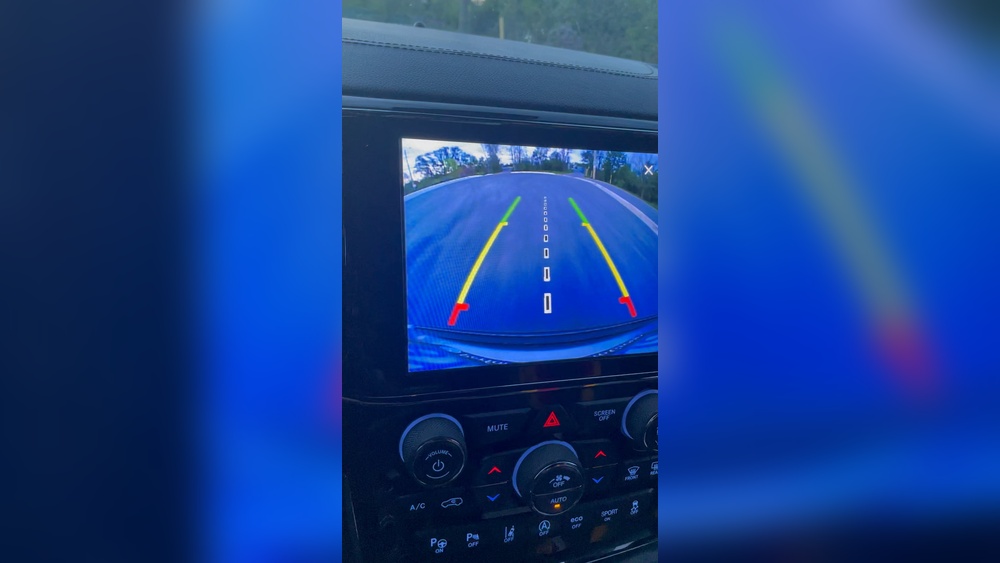
If you drive a Jeep Grand Cherokee, you know the backup camera is a valuable tool. It helps you park, avoid obstacles, and drive safely in reverse. But what happens when your backup camera gets stuck—showing the same image, a black screen, or refusing to switch off? This problem can be annoying and unsafe. Many drivers face this issue, but most don’t know why it happens or how to fix it. Let’s explore why the backup camera on a Jeep Grand Cherokee might get stuck, what you can do about it, and how you can prevent it from happening again.
Understanding The Jeep Grand Cherokee Backup Camera
The Jeep Grand Cherokee backup camera is part of the vehicle’s safety system. When you put the car in reverse, a small camera on the back sends a live video feed to your dashboard screen. This helps you see behind your vehicle, making parking and reversing much easier.
Most models from 2014 onward have this feature as standard. The system may also include parking guidelines and sensors to warn you about obstacles. The image should disappear when you shift out of reverse. If it doesn’t, or if it gets stuck on a single frame, the system is not working as it should.
Common Symptoms When The Backup Camera Gets Stuck
The problem can look different depending on your Jeep’s model year and the specific issue. Here are some common symptoms you might notice:
- The camera image freezes and does not update even if you move the car.
- The display stays on the backup camera view, even after you shift out of reverse.
- The screen stays black, blue, or blank.
- The camera works sometimes but not always (intermittent issue).
- The guidelines (the colored lines) freeze while the rest of the display updates.
These symptoms can be confusing. You might wonder if it’s a camera problem, a screen issue, or something else.
Why Does The Backup Camera Get Stuck?
Understanding the causes can help you troubleshoot and fix the problem. Here are the main reasons for a stuck backup camera in Jeep Grand Cherokee models:
1. Software Glitches
Modern Jeeps use Uconnect—a touchscreen system running complex software. Sometimes, the software can freeze or crash, just like a computer or smartphone. This can cause the backup camera image to get stuck.
2. Wiring And Connection Problems
The camera connects to the display with wires running through the vehicle. If these wires get loose, corroded, or damaged, the signal can be interrupted, causing the image to freeze or vanish.
3. Faulty Camera Module
Over time, the camera unit on the back of your Jeep can fail due to exposure to water, dirt, or simple wear and tear. A bad camera can send a frozen or no image at all.
4. Display Screen Issues
The problem may be with the dashboard screen itself, not the camera. If the display is malfunctioning, it may show a frozen image or get stuck on the backup view.
5. Transmission Sensor Malfunction
When you shift out of reverse, sensors tell the system to turn off the camera. If these sensors stop working, the display might stay stuck on the backup camera screen.
6. Blown Fuse Or Power Issues
A failing fuse or electrical problem can interrupt the power supply to the camera or display, causing strange behavior.
7. Water Or Dirt Ingress
The rear camera is exposed to weather. Water or dirt inside the lens or connections can cause short circuits or camera failure, which may result in a stuck image.
How To Diagnose A Stuck Backup Camera
Before you fix anything, it helps to know where the problem lies. Here’s how you can diagnose your Jeep Grand Cherokee’s backup camera issue:
- Restart the Vehicle: Sometimes, a simple restart can reset the system.
- Check for Error Messages: Look for warnings on the dashboard or Uconnect screen.
- Test the Camera: Shift into reverse several times. Notice if the problem is always there or only sometimes.
- Inspect the Camera Lens: Is it dirty, foggy, or cracked?
- Listen for Clicking Noises: When you shift into reverse, listen for any unusual sounds from the back of the vehicle.
- Check Other Features: If the radio, navigation, or other Uconnect features are also glitchy, the problem may be with the screen or software.
If you’re not comfortable with electrical work or removing panels, it’s best to have a technician do a deeper diagnosis.

Quick Fixes You Can Try
Many backup camera issues are minor and can be fixed without professional help. Here are some steps you can try before visiting a mechanic:
1. Soft Reset The Uconnect System
Most stuck camera issues are due to a temporary software glitch. Try this:
- Turn off your Jeep and open the driver’s door.
- Leave the door open for at least 60 seconds.
- Close the door and restart the vehicle.
On some models, you can also press and hold the power and volume knobs on the Uconnect screen for about 10 seconds to force a reset.
2. Clean The Camera Lens
Dirt, water, or road salt can cover the lens and cause problems. Gently clean the lens with a soft, damp cloth.
3. Check The Camera Connector
If you know where the camera plugs in (usually behind the rear hatch panel), make sure the connection is tight and not corroded.
4. Inspect The Fuses
Locate your Jeep’s fuse box (check the owner’s manual for the exact spot). Find the fuse for the backup camera or Uconnect system. If it’s blown, replace it with a fuse of the same rating.
5. Update The Uconnect Software
Sometimes, Jeep releases software updates to fix bugs. You can check for updates on the Uconnect website or ask your dealer. If your system is outdated, updating it can solve many camera issues.
6. Disconnect And Reconnect The Battery
This is a “hard reset” for the vehicle’s electronics.
- Turn off the engine.
- Open the hood and disconnect the negative battery terminal for 10–15 minutes.
- Reconnect and start the vehicle.
This can clear some glitches, but be careful: you may need to reset your radio or clock.
7. Test With A Different Gear
Shift between reverse, neutral, drive, and park a few times. If the screen returns to normal, the problem might be with the gear position sensor.
When To Seek Professional Help
If you try the above steps and your backup camera is still stuck, it’s time to see a professional. Here’s when you should visit a mechanic or Jeep dealer:
- The camera image is always frozen or black.
- The problem comes back often, even after resets.
- You see water inside the camera lens or wiring.
- You hear crackling sounds from the display or speakers.
- Other electrical features are not working (radio, lights, etc. ).
A trained technician can use special tools to check the camera wiring, run diagnostics on the Uconnect system, and replace any faulty parts.

Common Repairs And Costs
Repair costs can vary depending on the cause. Here are the most likely repairs and what you can expect to pay:
| Repair Type | Typical Cost (USD) | Time Needed |
|---|---|---|
| Backup Camera Replacement | $200–$500 | 1–2 hours |
| Uconnect Software Update | $0–$150 | 30–60 minutes |
| Wiring Repair | $100–$300 | 1–3 hours |
| Screen/Display Replacement | $400–$1,200 | 2–4 hours |
| Fuse Replacement | $10–$30 | 10–30 minutes |
Some repairs are covered under warranty, especially for newer vehicles. Check with your dealer first.
Preventing Backup Camera Problems
While some issues are unavoidable, you can reduce the risk of a stuck backup camera by following these tips:
- Keep the Camera Clean: Regularly wipe the lens, especially after driving in rain, snow, or mud.
- Update Your Software: Install updates for your Uconnect system when available.
- Check for Recalls: Jeep sometimes issues recalls for camera or software problems. Check your VIN on the official Jeep website.
- Avoid Power Surges: Don’t jump-start your Jeep incorrectly, as this can damage electronics.
- Be Gentle With Tailgate/Rear Hatch: Slamming can loosen camera connections.
- Inspect Wiring: If you notice moisture near the camera, have it checked for leaks or corrosion.

How Jeep Grand Cherokee Backup Cameras Compare To Other Suvs
Backup camera technology has improved over the years, but not all systems are equal. Here’s a comparison of the Jeep Grand Cherokee’s backup camera features with those of two popular competitors:
| Feature | Jeep Grand Cherokee | Ford Explorer | Toyota Highlander |
|---|---|---|---|
| Standard Camera | Yes (most trims) | Yes | Yes |
| Dynamic Guidelines | Yes (recent models) | Yes | Yes |
| Surround View | Optional (higher trims) | Optional | Optional |
| Known Stuck Issues | Occasional | Rare | Occasional |
| Repair Cost | Moderate | Moderate | High |
Insight: Jeep’s system is competitive but not immune to problems. Ford’s backup camera issues are less frequent, possibly due to different wiring and software design. Toyota Highlander has a reliable camera but can be more expensive to repair.
Real-world Example: A 2018 Grand Cherokee Owner’s Story
Maria owns a 2018 Jeep Grand Cherokee. One morning, her backup camera image froze on the screen and stayed there, even after she shifted out of reverse. She tried turning the car off and on, but the problem remained. After searching online forums, she learned about the Uconnect reset trick—holding down the volume and tune knobs for 10 seconds.
This fixed her problem immediately.
But two weeks later, the issue returned. Maria visited her dealership, where they discovered a loose connection at the camera plug. After securing the connector, the camera worked perfectly. The dealer also installed a software update to prevent future glitches.
Lesson: Sometimes, a quick reset helps, but if the problem returns, have a professional check the connections and update the software.
What Most Owners Overlook
Many drivers think the camera itself is always the problem. But in practice, the Uconnect software and wiring are just as likely to cause a stuck camera. Also, some owners don’t realize that aftermarket accessories—like trailer wiring kits or rear dash cams—can interfere with the camera system. If you recently installed something on your Jeep’s rear, disconnect it and see if the problem goes away.
Another common oversight is ignoring intermittent issues. Even if the problem goes away after a reset, it’s smart to have your system checked. Small electrical issues can get worse over time, leading to more expensive repairs.
Diy Vs. Professional Repair: What’s Best?
You can do some fixes yourself—like cleaning the lens, resetting the Uconnect, or changing a fuse. But for anything involving wires, the camera unit, or the dashboard display, it’s safer to let a trained technician handle the job. Modern SUVs have complex electronics.
Mistakes can make things worse or void your warranty.
If you want to try a DIY fix, always disconnect the battery first and follow instructions carefully. Watch out for sharp edges behind panels, and never force connectors—they can break easily.
The Role Of Recalls And Technical Service Bulletins (tsbs)
Jeep has issued recalls and TSBs for backup camera issues on some Grand Cherokee models. A recall means Jeep will fix the problem for free. A TSB is a guide for dealers on how to fix known problems, but it’s not always free.
You can check for recalls using your VIN on the NHTSA website. If your camera is stuck and your vehicle is listed, contact your dealer—they may repair it at no cost.
Backup Camera Troubleshooting At A Glance
Here’s a quick reference for what to do based on the symptom:
| Symptom | Likely Cause | What to Try First |
|---|---|---|
| Frozen Image | Software glitch, wiring issue | Reset Uconnect, check connections |
| Black Screen | Faulty camera, blown fuse | Inspect fuse, clean lens |
| Camera won’t turn off | Transmission sensor, software bug | Shift gears, update software |
| Intermittent issue | Loose connector, water ingress | Secure connections, dry out camera |
Frequently Asked Questions
Why Does My Jeep Grand Cherokee’s Backup Camera Freeze Only In Cold Weather?
Cold weather can affect electrical connections and the camera lens. Moisture can freeze inside the camera or wiring, causing signal loss or a frozen image. Try parking in a garage or warming up your vehicle before reversing.
Can A Dead Car Battery Cause The Backup Camera To Get Stuck?
Yes, a weak or dead battery can cause electronic glitches, including a stuck backup camera. Low voltage may interrupt the Uconnect system, requiring a reset after the battery is replaced.
Is It Safe To Drive If My Backup Camera Is Stuck?
You can drive, but you lose an important safety feature. Always check your mirrors and look behind you when reversing. Schedule a repair as soon as possible for your safety.
How Do I Know If My Backup Camera Problem Is Covered By A Recall?
Enter your Jeep’s VIN on the NHTSA website or ask your dealer. If your vehicle is included in a recall for the backup camera or Uconnect, repairs should be free.
Will Disconnecting The Battery Erase My Uconnect Settings?
Disconnecting the battery may reset the clock, radio presets, and some personalized settings. Most navigation and system data should be safe, but check your owner’s manual for details.
A stuck backup camera in your Jeep Grand Cherokee is frustrating, but most problems are fixable. Start with simple resets and cleaning. If that doesn’t work, don’t ignore the issue—seek help from a professional. Regular maintenance and quick action can keep your camera working reliably, making your driving experience safer and less stressful.